Add Breadcrumbs to Search Results Under Title
Add breadcrumbs under cards/guides/results when searching in the extension or web app. See example below for how this might look.
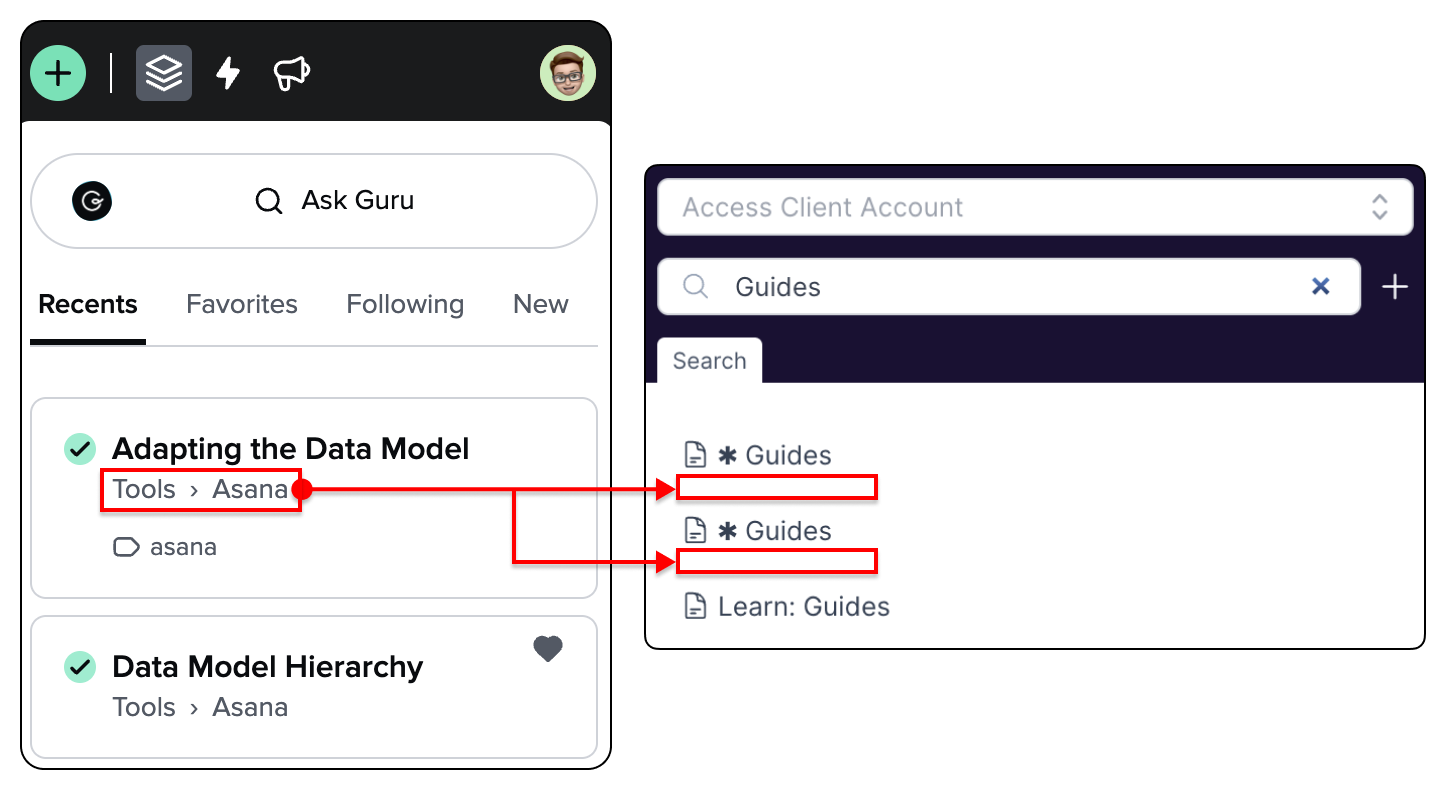
Guru has a similar hierarchy as Supered. In this example, “Tools” would be a base and “Asana” is a folder.
In the case where people have gone insane with deeply nested folders, recommend using ellipsis or something: Base › … › Parent Folder then showing full directly path in a tooltip on hover or focus state.
Other Notes for Clarity re: the Guru Example:
The little icon and word asana under the breadcrumbs is a tag.
The green checkmark to the left of the title indicates verification status.
The heart in the upper right of the second card indicates it’s favorited.
Log in to comment and vote
Comments1
Skyler Reeves
May 22, 2025
Addendum: The reason this matters is because Supered is it would help reduce ambiguity and enable repeatable patterns across Bases and Folders. e.g., the first and second ✱ Guides cards above are two very different resources.
Each is a hub card that acts as a single place people can go to see all available Guides (with links) within that context. In this case, the first ✱ Guides is a master list of links to Guides related to HubSpot while the second is a master list for another app called Clio.