New Feature: AI Prompt Library

With the new AI prompt library, you can build reusable AI prompts that your entire team can copy into Claude, Breeze, Agentforce, Pipedrive AI, or Supered Assistant.
Benefits
Consistent AI output: Reps use approved, tested prompts instead of writing their own.
Right prompt for the right AI: Tune prompts to what each AI can access, like a CRM-aware prompt for Breeze and a no-context prompt for Claude.
Starring: Star your favorite or most-used prompts for quicker access. This can be done on the prompt itself or when selecting prompts within Supered Assistant.
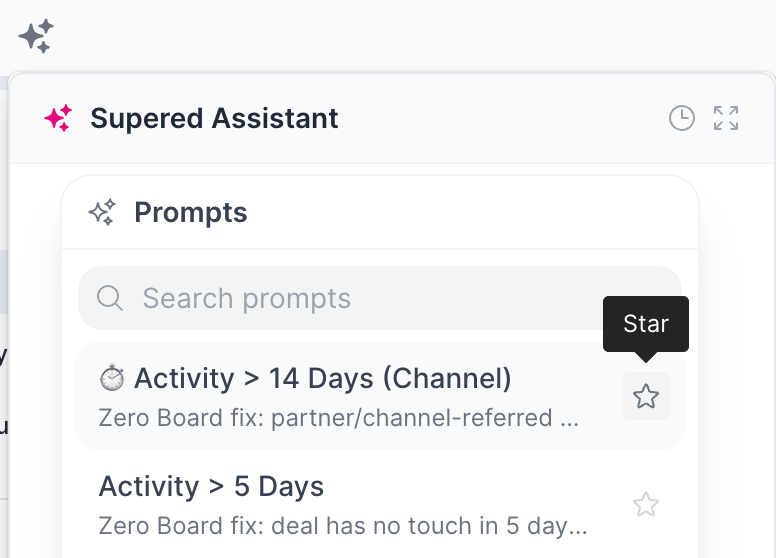

AI prompts:
Location: AI → Prompts
Includes: Title, description, and prompt content.
Write it yourself or use Create with AI to draft it with Supered Assistant.
Organize: Use folders to sort and organize prompts by team, subject, or goal.
Restrictions:
Choose connection: Claude, HubSpot Breeze, Agentforce, Pipedrive AI, and/or Supered Assistant. A connection must already exist.
Pipedrive AI: 300-character limit. Prompts over that limit are automatically disabled for Pipedrive.
Analytics: Usage data shows which prompts work and which get ignored.
Location: AI → Prompt Analytics
How to use prompts, once created:
Connection: Make sure you’re connected to the desired AI tool. Only prompts enabled for the AI you’re in can be used.
Select prompt: Open your prompt list using the + sign in the AI chat tool. When connected, you’ll see Supered prompts available.